

Sets, dictionaries, and data organization#
Learning objectives
By the end of this lab, you will be able to:
Create and manipulate sets in Python
Perform set operations (union, intersection, difference)
Create and manipulate dictionaries in Python
Access and modify dictionary values using keys
Iterate over dictionaries using loops
Choose the appropriate data structure (list, set, or dictionary) for different problems
Combine data structures to solve complex problems
Part 1: Sets in Python#
What is a set?#
A set is an unordered collection of unique items. Unlike lists, sets:
Do not maintain any specific order
Cannot contain duplicate values
Do not support indexing (you cannot access items by position)
Think of a set like a bag of unique items: you can add or remove items, check if something is in the bag, but the items have no specific arrangement.
Why use sets?#
Sets are useful when:
You need to store unique values (automatically removes duplicates)
You want to perform mathematical set operations (union, intersection, difference)
You need fast membership testing (checking if an item exists)
Creating sets#
There are two main ways to create sets:
# Method 1: Using the set() constructor
empty_set = set()
print(empty_set)  # set()
set()
# Method 2: Using curly braces with values
numbers = {1, 2, 3, 4, 5}
print(numbers)
{1, 2, 3, 4, 5}
Important: Empty sets
You cannot create an empty set using {} because that creates an empty dictionary instead. Always use set() for empty sets:
empty_set = set()- Creates an empty setempty_dict = {}- Creates an empty dictionarynot_a_set = {}- This is a dictionary, not a set!
# Sets automatically remove duplicates
numbers = {1, 2, 2, 3, 3, 3, 4}
print(numbers)  # {1, 2, 3, 4}
{1, 2, 3, 4}
# Creating a set from a list (removes duplicates)
duplicated_list = [1, 2, 2, 3, 3, 3, 4, 4, 4, 4]
unique_numbers = set(duplicated_list)
print(unique_numbers)  # {1, 2, 3, 4}
{1, 2, 3, 4}
# Sets can contain strings, numbers, and tuples
mixed_set = {1, "apple", 3.14, True}
print(mixed_set)
{1, 3.14, 'apple'}
What can be in a set?
Sets can only contain certain types of values:
Allowed: Strings, numbers (int, float), booleans, and tuples
Not allowed: Lists, sets, or dictionaries
This is because lists, sets, and dictionaries can be modified after creation, which would cause problems for how Python organizes data in sets. You will learn more about mutable and immutable types in Divide and conquer algorithms.
Adding elements to sets#
# add() adds one item to the set
genres = {"Novel", "Poetry"}
genres.add("Drama")
print(genres)  # Order may vary!
{'Poetry', 'Novel', 'Drama'}
# Adding a duplicate has no effect
genres.add("Novel")
print(genres)  # Still the same set
{'Poetry', 'Novel', 'Drama'}
# update() adds multiple items from another collection
genres.update({"Essay", "Biography"})
print(genres)
{'Poetry', 'Biography', 'Essay', 'Novel', 'Drama'}
# update() can also take a list
genres.update(["Short Story", "Memoir"])
print(genres)
{'Poetry', 'Memoir', 'Biography', 'Short Story', 'Essay', 'Novel', 'Drama'}
Removing elements from sets#
# remove() removes an item (raises error if not found)
numbers = {1, 2, 3, 4, 5}
numbers.remove(3)
print(numbers)
{1, 2, 4, 5}
# discard() removes an item (no error if not found)
numbers = {1, 2, 3, 4, 5}
numbers.discard(10)  # Item doesn't exist, but no error
print(numbers)  # Still {1, 2, 4, 5}
{1, 2, 3, 4, 5}
remove() vs discard()
Use
remove()when you expect the item to be in the set (you want an error if it is not)Use
discard()when you are not sure if the item exists (no error if it is missing)
Avoid defensive programming: prefer fail-fast
Use discard() only when you are absolutely certain that an item might not exist. In general, prefer remove() over discard(). It is better to write code that fails immediately when problems occur rather than code that silently hides errors. If your code does not fail when there is a structural problem, it may hide bugs that will be harder to find later. This is known as the fail-fast principle: letting bugs emerge immediately rather than being concealed by defensive code. See also: defensive programming antipatterns.
discard() only exists for sets
The discard() method exists only for sets, not for lists. Lists only have the remove() method. There is an ongoing discussion about potentially adding discard() to lists in the future.
# pop() removes and returns an arbitrary item
numbers = {1, 2, 3, 4, 5}
removed = numbers.pop()
print(f"Removed: {removed}")
print(f"Remaining: {numbers}")
Removed: 1
Remaining: {2, 3, 4, 5}
# clear() removes all items
numbers = {1, 2, 3, 4, 5}
numbers.clear()
print(numbers)  # set()
set()
Set length and membership testing#
# len() returns the number of items
colors = {"red", "green", "blue", "yellow"}
print(f"Number of colors: {len(colors)}")
Number of colors: 4
# Check if an item is in a set (very fast!)
colors = {"red", "green", "blue"}

print("red" in colors)      # True
print("purple" in colors)   # False
print("blue" not in colors) # False
True
False
False
Set operations#
Sets support mathematical operations that are very useful for comparing collections. These operations can be visualized using Venn diagrams, which were developed by mathematicians Leonhard Euler and John Venn to represent logical relationships between sets.
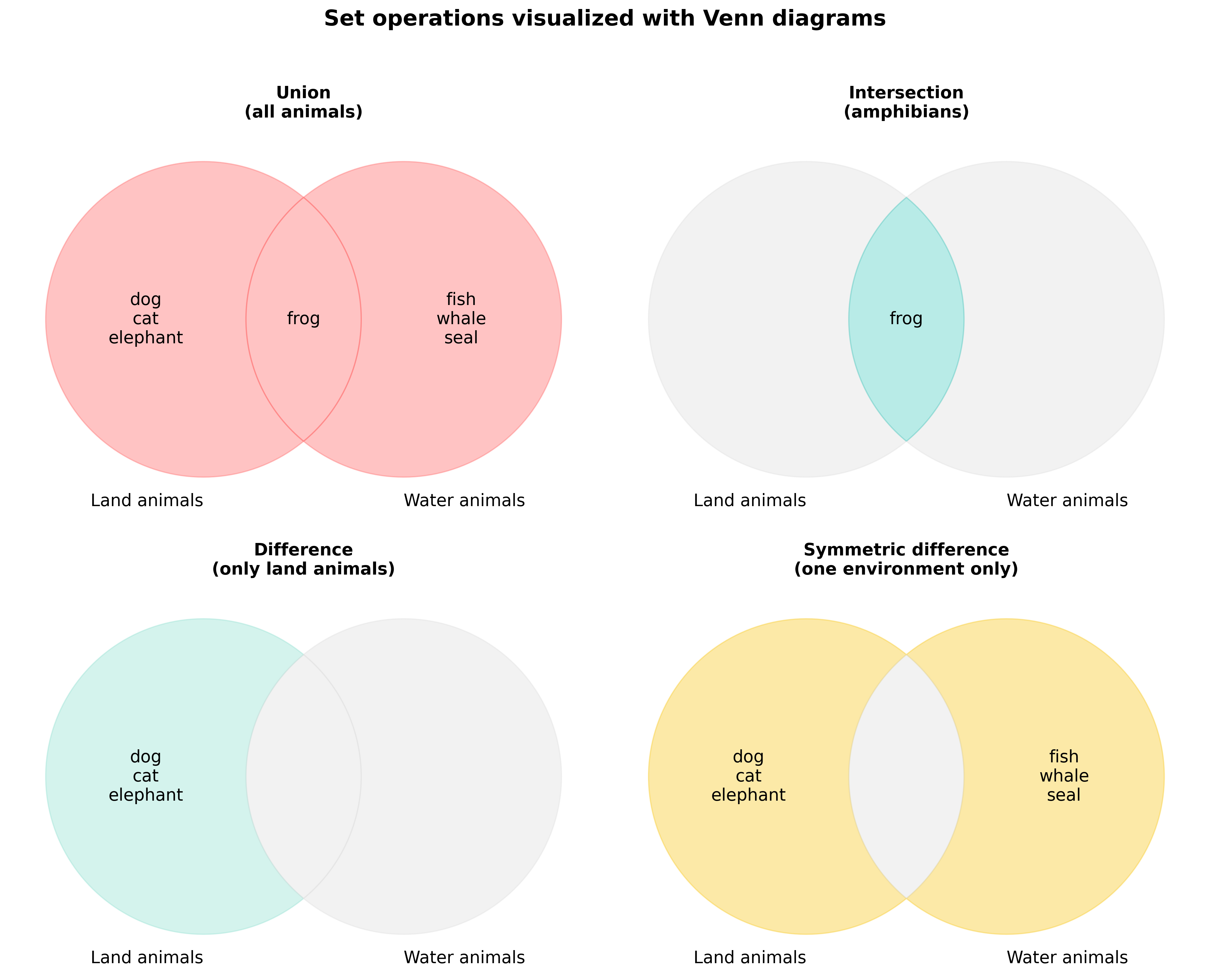
Fig. 35 Visual representation of set operations: union, intersection, difference, and symmetric difference.#
# Union: all items from both sets (no duplicates)
land_animals = {"dog", "cat", "elephant", "frog"}
water_animals = {"frog", "fish", "whale", "seal"}

union = land_animals.union(water_animals)
print(f"Union: {union}")

# Alternative syntax using |
union = land_animals | water_animals
print(f"Union: {union}")
Union: {'dog', 'elephant', 'whale', 'cat', 'seal', 'frog', 'fish'}
Union: {'dog', 'elephant', 'whale', 'cat', 'seal', 'frog', 'fish'}
# Intersection: only items that appear in both sets
land_animals = {"dog", "cat", "elephant", "frog"}
water_animals = {"frog", "fish", "whale", "seal"}

intersection = land_animals.intersection(water_animals)
print(f"Intersection: {intersection}")

# Alternative syntax using &
intersection = land_animals & water_animals
print(f"Intersection: {intersection}")
Intersection: {'frog'}
Intersection: {'frog'}
# Difference: items in first set but not in second
land_animals = {"dog", "cat", "elephant", "frog"}
water_animals = {"frog", "fish", "whale", "seal"}

difference = land_animals.difference(water_animals)
print(f"Difference (land - water): {difference}")

# Alternative syntax using -
difference = land_animals - water_animals
print(f"Difference (land - water): {difference}")
Difference (land - water): {'cat', 'elephant', 'dog'}
Difference (land - water): {'cat', 'elephant', 'dog'}
# Symmetric difference: items in either set, but not in both
land_animals = {"dog", "cat", "elephant", "frog"}
water_animals = {"frog", "fish", "whale", "seal"}

sym_diff = land_animals.symmetric_difference(water_animals)
print(f"Symmetric difference: {sym_diff}")

# Alternative syntax using ^
sym_diff = land_animals ^ water_animals
print(f"Symmetric difference: {sym_diff}")
Symmetric difference: {'dog', 'elephant', 'whale', 'cat', 'seal', 'fish'}
Symmetric difference: {'dog', 'elephant', 'whale', 'cat', 'seal', 'fish'}
Practical example: Finding unique words#
# Count unique words in a passage from "The Raven" by Edgar Allan Poe
text = "while I nodded nearly napping suddenly there came a tapping as of some one gently rapping rapping at my chamber door tapping at my chamber door"
words = text.split()  # Split into list of words

print(f"Total words: {len(words)}")

unique_words = set(words)
print(f"Unique words: {len(unique_words)}")
print(f"Words: {unique_words}")
Total words: 26
Unique words: 20
Words: {'as', 'a', 'nearly', 'my', 'suddenly', 'gently', 'napping', 'tapping', 'chamber', 'while', 'there', 'rapping', 'I', 'nodded', 'at', 'some', 'door', 'one', 'came', 'of'}
Iterating over sets#
# Use for loop (order is unpredictable!)
colors = {"red", "green", "blue", "yellow"}

for color in colors:
    print(color)
blue
green
yellow
red
Sets are unordered
The order in which items appear when iterating over a set is unpredictable and may change between runs. If you need a specific order, convert the set to a sorted list first: sorted(my_set).
Part 2: Dictionaries in Python#
What is a dictionary?#
A dictionary is an unordered collection of key-value pairs. Each key is associated with a value, like a real dictionary where each word (key) has a definition (value).
Think of a dictionary like a phone book: you look up a name (key) to find a phone number (value).
Why use dictionaries?#
Dictionaries are useful when:
You need to associate related pieces of information (e.g., name → phone number)
You want fast lookup by a meaningful identifier (key) instead of numeric index
You need to store structured data with named fields
Creating dictionaries#
# Method 1: Using the dict() constructor
empty_dict = dict()
print(empty_dict)  # {}
{}
# Method 2: Using curly braces with key-value pairs
phone_book = {
    "Nestore": "3341234567",
    "Adriana": "3359876543",
    "Orlando": "3385551234"
}
print(phone_book)
{'Nestore': '3341234567', 'Adriana': '3359876543', 'Orlando': '3385551234'}
# Keys can be strings, numbers, or tuples
mixed_keys = {
    "name": "Alice",
    42: "answer",
    (1, 2): "coordinates"
}
print(mixed_keys)
{'name': 'Alice', 42: 'answer', (1, 2): 'coordinates'}
What can be a dictionary key?
Dictionary keys can only be certain types of values:
Allowed: Strings, numbers (int, float), booleans, and tuples
Not allowed: Lists, sets, or dictionaries
This is the same restriction as for set elements. Keys must be types that cannot be modified after creation. You will learn more about this in Divide and conquer algorithms.
# Values can be any type
person = {
    "name": "Nestore",
    "age": 30,
    "height": 1.75,
    "employed": True,
    "skills": ["Python", "JavaScript", "SQL"]
}
print(person)
{'name': 'Nestore', 'age': 30, 'height': 1.75, 'employed': True, 'skills': ['Python', 'JavaScript', 'SQL']}
Accessing dictionary values#
# Access value using key in square brackets
phone_book = {
    "Nestore": "3341234567",
    "Adriana": "3359876543"
}

print(phone_book["Nestore"])  # 3341234567
3341234567
# Using get() method (safer - returns None if key not found)
phone_book = {
    "Nestore": "3341234567",
    "Adriana": "3359876543"
}

print(phone_book.get("Nestore"))      # 3341234567
print(phone_book.get("Orlando"))    # None (no error)
print(phone_book.get("Orlando", "Not found"))  # Custom default value
3341234567
None
Not found
Direct access vs get()
dict[key]raises aKeyErrorif the key does not existdict.get(key)returnsNoneif the key does not exist (no error)dict.get(key, default)returns a custom default value if the key does not exist
Use get() when you are not sure if the key exists. Use direct access [] when you expect the key to be there.
Avoid defensive programming: prefer fail-fast
Use get() only when you are absolutely certain that a key might not exist. In general, prefer direct access dict[key] over dict.get(key). It is better to write code that fails immediately when problems occur rather than code that silently hides errors. If your code does not fail when there is a structural problem, it may hide bugs that will be harder to find later. This is known as the fail-fast principle: letting bugs emerge immediately rather than being concealed by defensive code. See also: defensive programming antipatterns.
Adding and updating values#
# Add a new key-value pair
phone_book = {
    "Nestore": "3341234567",
    "Adriana": "3359876543"
}

phone_book["Orlando"] = "3385551234"
print(phone_book)
{'Nestore': '3341234567', 'Adriana': '3359876543', 'Orlando': '3385551234'}
# Update an existing value
phone_book["Nestore"] = "3349999999"
print(phone_book)
{'Nestore': '3349999999', 'Adriana': '3359876543', 'Orlando': '3385551234'}
# update() adds multiple key-value pairs from another dictionary
phone_book.update({
    "Beatrice": "3391112233",
    "Ettore": "3474445566"
})
print(phone_book)
{'Nestore': '3349999999', 'Adriana': '3359876543', 'Orlando': '3385551234', 'Beatrice': '3391112233', 'Ettore': '3474445566'}
Removing items from dictionaries#
# del removes a key-value pair
phone_book = {
    "Nestore": "3341234567",
    "Adriana": "3359876543",
    "Orlando": "3385551234"
}

del phone_book["Adriana"]
print(phone_book)
{'Nestore': '3341234567', 'Orlando': '3385551234'}
# pop() removes and returns the value
phone_book = {
    "Nestore": "3341234567",
    "Adriana": "3359876543"
}

removed_number = phone_book.pop("Nestore")
print(f"Removed: {removed_number}")
print(f"Remaining: {phone_book}")
Removed: 3341234567
Remaining: {'Adriana': '3359876543'}
# pop() with default value (no error if key not found)
phone_book = {"Nestore": "3341234567"}

removed = phone_book.pop("Adriana", "Not found")
print(f"Removed: {removed}")
print(f"Remaining: {phone_book}")
Removed: Not found
Remaining: {'Nestore': '3341234567'}
# clear() removes all items
phone_book = {
    "Nestore": "3341234567",
    "Adriana": "3359876543"
}

phone_book.clear()
print(phone_book)  # {}
{}
Dictionary methods: keys(), values(), items()#
# keys() returns all keys
person = {
    "name": "Nestore",
    "age": 30,
    "city": "Bologna"
}

print(person.keys())  # dict_keys(['name', 'age', 'city'])
dict_keys(['name', 'age', 'city'])
# values() returns all values
print(person.values())  # dict_values(['Nestore', 30, 'Bologna'])
dict_values(['Nestore', 30, 'Bologna'])
# items() returns all key-value pairs as tuples
print(person.items())  # dict_items([('name', 'Nestore'), ('age', 30), ('city', 'Bologna')])
dict_items([('name', 'Nestore'), ('age', 30), ('city', 'Bologna')])
# Convert to lists
print(list(person.keys()))
print(list(person.values()))
print(list(person.items()))
['name', 'age', 'city']
['Nestore', 30, 'Bologna']
[('name', 'Nestore'), ('age', 30), ('city', 'Bologna')]
Checking if a key exists#
# Use 'in' to check if a key exists
person = {
    "name": "Nestore",
    "age": 30
}

print("name" in person)      # True
print("address" in person)   # False
print("age" not in person)   # False
True
False
False
Dictionary length#
# len() returns the number of key-value pairs
person = {
    "name": "Nestore",
    "age": 30,
    "city": "Bologna"
}

print(f"Number of fields: {len(person)}")
Number of fields: 3
Iterating over dictionaries#
# Iterate over keys (default behavior)
person = {
    "name": "Nestore",
    "age": 30,
    "city": "Bologna"
}

for key in person:
    print(key)
name
age
city
# Iterate over keys explicitly
for key in person.keys():
    print(key)
name
age
city
# Iterate over values
for value in person.values():
    print(value)
Nestore
30
Bologna
# Iterate over key-value pairs (most useful!)
for key, value in person.items():
    print(f"{key}: {value}")
name: Nestore
age: 30
city: Bologna
What are tuples?
A tuple is an ordered, immutable collection of items written with parentheses: (value1, value2, ...). Think of tuples as lists that cannot be modified after creation.
Unpacking in loops
When you write for key, value in person.items(), Python automatically unpacks each tuple from items() into two variables:
items()returns[('name', 'Nestore'), ('age', 30), ...]Each iteration assigns
key = 'name'andvalue = 'Nestore', thenkey = 'age'andvalue = 30, etc.
This is called tuple unpacking and is very common when working with dictionaries.
Practical example: Counting occurrences#
# Count how many times each letter appears in a word
word = "cappuccino"
letter_counts = {}

for letter in word:
    if letter in letter_counts:
        letter_counts[letter] += 1
    else:
        letter_counts[letter] = 1

print(letter_counts)
{'c': 3, 'a': 1, 'p': 2, 'u': 1, 'i': 1, 'n': 1, 'o': 1}
# Same example using get() method (cleaner)
word = "cappuccino"
letter_counts = {}

for letter in word:
    letter_counts[letter] = letter_counts.get(letter, 0) + 1

print(letter_counts)
{'c': 3, 'a': 1, 'p': 2, 'u': 1, 'i': 1, 'n': 1, 'o': 1}
Part 3: Choosing the right data structure#
Understanding when to use each data structure is crucial for writing clean, efficient code.
Lists: Ordered collections with duplicates#
Use lists when:
Order matters (first, second, third, etc.)
You need to access items by numeric position (index)
Duplicates are allowed and meaningful
You need to maintain insertion order
Examples:
Sequence of steps in a recipe
History of user actions (chronological order)
Student test scores (same student can appear multiple times)
# Example: List of daily temperatures (order and duplicates matter)
temperatures = [22, 23, 22, 24, 22, 25, 23]
print(f"Temperature on day 1: {temperatures[0]}°C")
print(f"Temperature on day 5: {temperatures[4]}°C")
Temperature on day 1: 22°C
Temperature on day 5: 22°C
Sets: Unique, unordered collections#
Use sets when:
You only care about unique values (no duplicates)
Order does not matter
You need to perform set operations (union, intersection, difference)
You need fast membership testing (“is X in the collection?”)
Examples:
Collecting unique tags or categories
Finding common elements between two collections
Removing duplicates from a list
# Example: Unique visitors to a website
visitors_day1 = {"Nestore", "Adriana", "Orlando"}
visitors_day2 = {"Adriana", "Beatrice", "Nestore"}

# Who visited both days?
both_days = visitors_day1.intersection(visitors_day2)
print(f"Visited both days: {both_days}")

# Who visited at least once?
total_visitors = visitors_day1.union(visitors_day2)
print(f"Total unique visitors: {total_visitors}")
Visited both days: {'Nestore', 'Adriana'}
Total unique visitors: {'Adriana', 'Beatrice', 'Nestore', 'Orlando'}
Dictionaries: Key-value associations#
Use dictionaries when:
You need to associate related pieces of information (key → value)
You want to look up values by a meaningful identifier (not numeric index)
Each key should map to exactly one value
You need to count occurrences or group data
Examples:
Storing configuration settings (setting name → value)
Phone book (name → phone number)
Counting word frequencies (word → count)
Storing structured data with named fields
# Example: Student grades (name → grade)
grades = {
    "Nestore": 28,
    "Adriana": 30,
    "Orlando": 25
}

# Look up by name (not position)
print(f"Adriana's grade: {grades['Adriana']}")
Adriana's grade: 30
Comparison table#
Feature |
List |
Set |
Dictionary |
|---|---|---|---|
Ordered |
Yes |
No |
No (Python 3.7+ maintains insertion order) |
Duplicates allowed |
Yes |
No |
No (keys must be unique) |
Access by index |
Yes |
No |
No (access by key) |
Access by key |
No |
No |
Yes |
Mutable |
Yes |
Yes |
Yes |
Syntax |
|
|
|
Part 4: Hands-on exercise#
Word frequency analyzer#
Create a program that analyzes text and provides various statistics about word usage.
Setup:
Create a new file: word_frequency.py
Requirements:
Define
tokenize(text)that:Takes a string of text
Removes common punctuation (.,!?;:)
Converts to lowercase
Splits into words (tokens)
Returns a list of tokens
Example:
"Hello, world!"→["hello", "world"]This is a helper function that will be reused by other functions
Define
count_words(text)that:Takes a string of text
Uses
tokenize()to get a list of tokensReturns a dictionary where keys are words and values are their frequencies
Example:
"the cat and the dog"→{"the": 2, "cat": 1, "and": 1, "dog": 1}
Define
find_unique_words(text)that:Takes a string of text
Uses
tokenize()to get a list of tokensReturns all unique words
Define
find_common_words(text1, text2)that:Takes two strings of text
Uses
tokenize()on both textsReturns all words that appear in both texts
Define
find_words_by_length(text, length)that:Takes a string of text and an integer length
Uses
tokenize()to get a list of tokensReturns all words with exactly that length
Example:
find_words_by_length("the cat and dog", 3)→{"the", "cat", "and", "dog"}
Define
find_rare_words(word_counts)that:Takes a dictionary of word counts (from
count_words())Returns words that appear only once
Example usage:
text = "while I nodded nearly napping suddenly there came a tapping as of some one gently rapping rapping at my chamber door tapping at my chamber door"

counts = count_words(text)
print(counts)

unique = find_unique_words(text)
print(f"Unique words: {len(unique)}")

text2 = "once upon a midnight dreary while I pondered weak and weary"
common = find_common_words(text, text2)
Solution
def tokenize(text):
    for char in ".,!?;:":
        text = text.replace(char, "")
    return text.lower().split()


def count_words(text):
    words = tokenize(text)
    word_counts = {}
    for word in words:
        word_counts[word] = word_counts.get(word, 0) + 1
    return word_counts


def find_unique_words(text):
    words = tokenize(text)
    return set(words)


def find_common_words(text1, text2):
    words1 = set(tokenize(text1))
    words2 = set(tokenize(text2))
    return words1.intersection(words2)


def find_words_by_length(text, length):
    words = tokenize(text)
    result = set()
    for word in words:
        if len(word) == length:
            result.add(word)
    return result


def find_rare_words(word_counts):
    rare = set()
    for word, count in word_counts.items():
        if count == 1:
            rare.add(word)
    return rare
Summary#
In this lab, you learned:
Creating and manipulating sets:
set(),{},add(),remove(),discard(),pop(),clear()Set operations:
union(),intersection(),difference(),symmetric_difference()Set membership testing:
in,not in(very fast!)Creating and manipulating dictionaries:
dict(),{}, adding, updating, removing itemsAccessing dictionary values:
dict[key],dict.get(key),dict.get(key, default)Dictionary methods:
.keys(),.values(),.items()Iterating over dictionaries:
for key in dict:,for key, value in dict.items():Choosing the right data structure: When to use lists, sets, or dictionaries
Performance considerations: Fast membership testing with sets and dictionaries
Combining data structures: Using sets and dictionaries together to solve problems
Next lab
In Lab 05, you will practice brute-force algorithms like linear search and insertion sort.