

Configuring and populating a graph database#
In this chapter, we show how to use RDF and Blazegraph to create a graph database using Python.
What is RDF#
The Resource Description Framework (RDF) is a high-level data model (some times it is improperly called “language”) based on triples subject-predicate-object called statements. For instance, a simple natural language sentence such as Umberto Eco is author of The name of the rose can be expressed through an RDF statement assigning to:
Umberto Eco the role of subject;
is author of the role of predicate;
The name of the rose the role of object.
The main entities comprising RDF are listed as follows.
Resources#
A resource is an object we want to talk about, and it is identified by an IRI. IRIs are the most generic class of Internet identifiers for resources, but often HTTP URLs are used instead, which may be considered a subclass of IRIs (e.g. the URL http://www.wikidata.org/entity/Q12807 identifies Umberto Eco in Wikidata).
Properties#
A property is a special type of resource since it is used to describe relation between resources, and it is identified by an IRI (e.g. the URL http://www.wikidata.org/prop/direct/P800 identifies the property has notable work - which mimic the is author of predicate of the statement above).
Statements#
Statements enable one to assert properties between resources. Each statement is a triple subject-predicate-object, where the subject is a resource, the predicate is a property, and the object is either a resource or a literal (i.e. a string).
There are different notations that can be used to represent statements in RDF in plain text files. The simplest (and most verbose) one is called N-Triples. It allows to define statements according to the following syntax:
# 1) statement with a resource as an object
<IRI subject> <IRI predicate> <IRI object> .

# 2) statement with a literal as an object
<IRI subject> <IRI predicate> "literal value"^^<IRI type of value> .
Type (1) statements must be used to state relationships between resources, while type (2) statements are generally used to associate attributes to a specific resource (the IRI defining the type of value is not specified for generic literals, i.e. strings). For instance, in Wikidata, the exemplar sentence above (Umberto Eco is author of The name of the rose) is defined by three distict RDF statements:
<http://www.wikidata.org/entity/Q12807> <http://www.w3.org/2000/01/rdf-schema#label> "Umberto Eco" .

<http://www.wikidata.org/entity/Q172850> <http://www.w3.org/2000/01/rdf-schema#label> "The Name of the Rose" .

<http://www.wikidata.org/entity/Q12807> <http://www.wikidata.org/prop/direct/P800> <http://www.wikidata.org/entity/Q172850> .
Actually, the relation described by the natural language sentence is defined by the third RDF statement above. However, two additional statements have been added to associate the strings representing the name of the resources referring to Umberto Eco and The name of the rose. Be aware: literals (i.e. simple values) cannot be subjects in any statement.
A special property#
While all the properties you can use in your statements as predicates can be defined in several distinct vocabularies (the Wikidata data model, schema.org data model, etc.), RDF defines a special property that is used to associate a resource to its intended type (e.g. another resource representing a class of resources). The IRI of this property is http://www.w3.org/1999/02/22-rdf-syntax-ns#type. For instance, we can use this property to assign the appropriate type of object to the two entities defined in the excerpt above, i.e. that referencing to Umberto Eco and The name of the rose, as shown as follows:
<http://www.wikidata.org/entity/Q12807> <http://www.w3.org/1999/02/22-rdf-syntax-ns#type> <https://schema.org/Person> .

<http://www.wikidata.org/entity/Q172850> <http://www.w3.org/1999/02/22-rdf-syntax-ns#type> <https://schema.org/Book> .
In the example above, we reuse two existing classes of resources included in schema.org for people and books. It is worth mentioning that an existing resource can be associated via http://www.w3.org/1999/02/22-rdf-syntax-ns#type to one or more types, if they apply.
RDF Graphs#
An RDF Graph is a set of RDF statements. For instance, a file that contains RDF statements represents an RDF graph, and IRIs contained in different graph actually refer to the same resource.
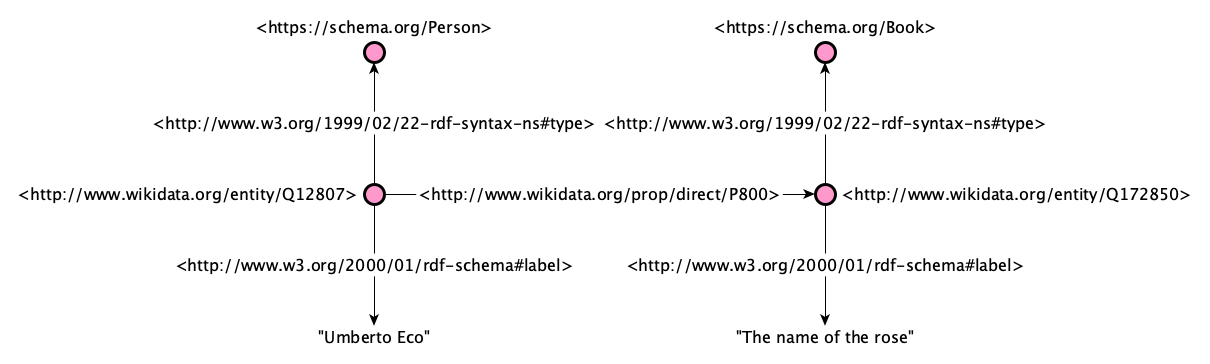
We talk about graphs in this context because all the RDF statements, and the resources they include, actually defined a direct graph structure, where the direct edges are labelled with the predicates of the statements and the subjects and objects are nodes linked through such edges. For instance, the diagram below represents all the RDF statements introduced above using a visual graph.
Triplestores#
A triplestore is a database built for storing and retrieving RDF statements, and can contain one or more RDF graphs.
Blazegraph, a database for RDF data#
Blazegraph DB is a ultra high-performance graph database supporting RDF/SPARQL APIs (thus, it is a triplestore). It supports up to 50 Billion edges on a single machine. Its code is entirely open source and available on GitHub.
Running this database as a server application is very simple. One has just to download the .jar application, put it in a directory, and run it from a shell as follows:
java -server -Xmx1g -jar blazegraph.jar
You need at least Java 9 installed in your system. If you do not have it, you can easily dowload and install it from the Java webpage. As you can see from the output of the command above, the database will be exposed via HTTP at a specific IP address:

However, from your local machine, you can always contact it at the following URL:
http://127.0.0.1:9999/blazegraph/
From a diagram to a graph#
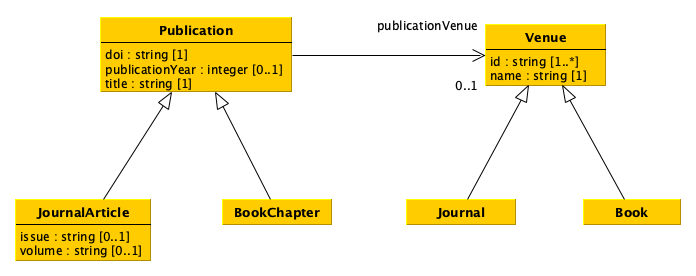
As you can see, the UML diagram introduced in the previous lecture, which I recall below, is already organised as a (directed) graph. Thus, translating such a data model into an RDF graph database is kind of straightforward.
The important thing to decide, in this context, is to clarify what are the names (i.e. the URLs) of the classes and properties to use to represent the data compliant with the data model. In particular:
supposing that each resource will be assigned to at least one of the types defined in the data model, we need to identify the names of all the most concrete classes (e.g.
JournalArticle,BookChapter,Journal,Book);each attribute of each UML class will be represented by a distinct RDF property which will be involved in statements where the subjects are always resources of the class in consideration and the objects are simple literals (i.e. values). Of course, we have to identify the names of these properties (i.e. the URLs);
each relation starting from an UML class and ending in another UML class will be represented by a distinct RDF property which will be involved in statements where the subjects are always resources of the source class while the objects are resources of the target class. Of course, we have to identify the names of these properties (i.e. the URLs);
please, bear in mind that all attributes and relations defined in a class are inherited (i.e. can be used by) all its subclasses.
You can choose to reuse existing classes and properties (e.g. as defined in schema.org) or create your own. In the latter case, you have to remind to use an URL you are in control of (e.g. your website or GitHub repository). For instance, a possible pattern for defining your own name for the class Book could be https://<your website>/Book (e.g. https://essepuntato.it/Book). Of course, there are strategies and guidelines that should be used to implement appropriately data model in RDF-compliant languages. However these are out of the scope of the present course (and will be clarified in other courses).
The name of all the classes and properties I will use in the examples in this tutorial are as follows:
UML class
JournalArticle:https://schema.org/ScholarlyArticle;UML class
BookChapter:https://schema.org/Chapter;UML class
Journal:https://schema.org/Periodical;UML class
Book:https://schema.org/Book;UML attribute
doiof classPublication:https://schema.org/identifier;UML attribute
publicationYearof classPublication:https://schema.org/datePublished;UML attribute
titleof classPublication:https://schema.org/name;UML attribute
issueof classJournalArticle:https://schema.org/issueNumber;UML attribute
volumeof classJournalArticle:https://schema.org/volumeNumber;UML attribute
idof classVenue:https://schema.org/identifier;UML attribute
nameof classVenue:https://schema.org/name;UML relation
publicationVenueof classPublication:https://schema.org/isPartOf.
Using RDF in Python#
The library rdflib provides classes and methods that allow one to create RDF graphs and populating them with RDF statements. It can be installed using the pip command as follows:
pip install rdflib
The class Graph is used to create an (initially empty) RDF graph, as shown as follows:
from rdflib import Graph

my_graph = Graph()
All the resources (including the properties) are defined using the class URIRef. The constructor of this class takes in input a string representing the IRI (or URL) of the resource in consideration. For instance, the code below shows all the resources mentioned above, i.e. those referring to classes, attributes and relations:
from rdflib import URIRef

# classes of resources
JournalArticle = URIRef("https://schema.org/ScholarlyArticle")
BookChapter = URIRef("https://schema.org/Chapter")
Journal = URIRef("https://schema.org/Periodical")
Book = URIRef("https://schema.org/Book")

# attributes related to classes
doi = URIRef("https://schema.org/identifier")
publicationYear = URIRef("https://schema.org/datePublished")
title = URIRef("https://schema.org/name")
issue = URIRef("https://schema.org/issueNumber")
volume = URIRef("https://schema.org/volumeNumber")
identifier = URIRef("https://schema.org/identifier")
name = URIRef("https://schema.org/name")

# relations among classes
publicationVenue = URIRef("https://schema.org/isPartOf")
Instead, literals (i.e. value to specify as objects of RDF statements) can be created using the class Literal. The constructor of this class takes in input a value (of any basic type: it can be a string, an integer, etc.) and create the related literal object in RDF, as shown in the next excerpt:
from rdflib import Literal

a_string = Literal("a string with this value")
a_number = Literal(42)
a_boolean = Literal(True)
Using these classes it is possible to create all the Python objects necessary to create statements describing all the data to be pushed into an RDF graph. We need to use the method add to add a new RDF statement to a graph. Such method takes in input a tuple of three elements defining the subject (an URIRef), the predicate (another URIRef) and the object (either an URIRef or a Literal) of the statements.
The following code show how to populate the RDF graph defining using the data obtained by processing the two CSV documents presented in previous tutorials. i.e. that of the publications and that of the venues. For instance, all the venues are created using the following code:
from pandas import read_csv, Series
from rdflib import RDF

# This is the string defining the base URL used to defined
# the URLs of all the resources created from the data
base_url = "https://thinkcompute.github.io/res/"

venues = read_csv("notebook/01-venues.csv",
                  keep_default_na=False,
                  dtype={
                      "id": "string",
                      "name": "string",
                      "type": "string"
                  })

venue_internal_id = {}
for idx, row in venues.iterrows():
    local_id = "venue-" + str(idx)

    # The shape of the new resources that are venues is
    # 'https://comp-data.github.io/res/venue-<integer>'
    subj = URIRef(base_url + local_id)

    # We put the new venue resources created here, to use them
    # when creating publications
    venue_internal_id[row["id"]] = subj

    if row["type"] == "journal":
        # RDF.type is the URIRef already provided by rdflib of the property
        # 'http://www.w3.org/1999/02/22-rdf-syntax-ns#type'
        my_graph.add((subj, RDF.type, Journal))
    else:
        my_graph.add((subj, RDF.type, Book))

    my_graph.add((subj, name, Literal(row["name"])))
    my_graph.add((subj, identifier, Literal(row["id"])))
As you can see, all the RDF triples have been added to the graph, that currently contain the following number of distinct triples (which is coincident with the number of cells in the original table):
print("-- Number of triples added to the graph after processing the venues")
print(len(my_graph))
-- Number of triples added to the graph after processing the venues
12
The same approach can be used to add information about the publications, as shown as follows:
publications = read_csv("notebook/01-publications.csv",
                        keep_default_na=False,
                        dtype={
                            "doi": "string",
                            "title": "string",
                            "publication year": "int",
                            "publication venue": "string",
                            "type": "string",
                            "issue": "string",
                            "volume": "string"
                        })

for idx, row in publications.iterrows():
    local_id = "publication-" + str(idx)

    # The shape of the new resources that are publications is
    # 'https://comp-data.github.io/res/publication-<integer>'
    subj = URIRef(base_url + local_id)

    if row["type"] == "journal article":
        my_graph.add((subj, RDF.type, JournalArticle))

        # These two statements applies only to journal articles
        my_graph.add((subj, issue, Literal(row["issue"])))
        my_graph.add((subj, volume, Literal(row["volume"])))
    else:
        my_graph.add((subj, RDF.type, BookChapter))

    my_graph.add((subj, name, Literal(row["title"])))
    my_graph.add((subj, identifier, Literal(row["doi"])))

    # The original value here has been casted to string since the Date type
    # in schema.org ('https://schema.org/Date') is actually a string-like value
    my_graph.add((subj, publicationYear, Literal(str(row["publication year"]))))

    # The URL of the related publication venue is taken from the previous
    # dictionary defined when processing the venues
    my_graph.add((subj, publicationVenue, venue_internal_id[row["publication venue"]]))
After the addition of this new statements, the number of total RDF triples added to the graph is equal to all the cells in the venue CSV plus all the non-empty cells in the publication CSV:
print("-- Number of triples added to the graph after processing venues and publications")
print(len(my_graph))
-- Number of triples added to the graph after processing venues and publications
31
It is worth mentioning that we should not map in RDF cells in the original table that do not contain any value. Thus, if for instance there is an issue cell in the publication CSV which is empty (i.e. no information about the issue have been specified), you should not create any RDF statement mapping such a non-information.
How to create and populate a graph database with Python#
Once we have created our graph with all the triples we need, we can upload persistently the graph on our triplestore. In order to do that, we have to create an instance of the class SPARQLUpdateStore, which acts as a proxy to interact with the triplestore. The important thing is to open the connection with the store passing, as input, a tuple of two strings with the same URLs, defining the SPARQL endpoint of the triplestore where to upload the data.
Then, we can upload triple by triple using a for-each iteration over the list of RDF statements obtained by using the method triples of the class Graph, passing as input a tuple with three None values, as shown as follows:
from rdflib.plugins.stores.sparqlstore import SPARQLUpdateStore

store = SPARQLUpdateStore()

# The URL of the SPARQL endpoint is the same URL of the Blazegraph
# instance + '/sparql'
endpoint = 'http://127.0.0.1:9999/blazegraph/sparql'

# It opens the connection with the SPARQL endpoint instance
store.open((endpoint, endpoint))

for triple in my_graph.triples((None, None, None)):
   store.add(triple)

# Once finished, remeber to close the connection
store.close()
---------------------------------------------------------------------------
ConnectionRefusedError                    Traceback (most recent call last)
File /opt/hostedtoolcache/Python/3.11.15/x64/lib/python3.11/urllib/request.py:1348, in AbstractHTTPHandler.do_open(self, http_class, req, **http_conn_args)
   1347 try:
-> 1348     h.request(req.get_method(), req.selector, req.data, headers,
   1349               encode_chunked=req.has_header('Transfer-encoding'))
   1350 except OSError as err: # timeout error

File /opt/hostedtoolcache/Python/3.11.15/x64/lib/python3.11/http/client.py:1323, in HTTPConnection.request(self, method, url, body, headers, encode_chunked)
   1322 """Send a complete request to the server."""
-> 1323 self._send_request(method, url, body, headers, encode_chunked)

File /opt/hostedtoolcache/Python/3.11.15/x64/lib/python3.11/http/client.py:1369, in HTTPConnection._send_request(self, method, url, body, headers, encode_chunked)
   1368     body = _encode(body, 'body')
-> 1369 self.endheaders(body, encode_chunked=encode_chunked)

File /opt/hostedtoolcache/Python/3.11.15/x64/lib/python3.11/http/client.py:1318, in HTTPConnection.endheaders(self, message_body, encode_chunked)
   1317     raise CannotSendHeader()
-> 1318 self._send_output(message_body, encode_chunked=encode_chunked)

File /opt/hostedtoolcache/Python/3.11.15/x64/lib/python3.11/http/client.py:1078, in HTTPConnection._send_output(self, message_body, encode_chunked)
   1077 del self._buffer[:]
-> 1078 self.send(msg)
   1080 if message_body is not None:
   1081
   1082     # create a consistent interface to message_body

File /opt/hostedtoolcache/Python/3.11.15/x64/lib/python3.11/http/client.py:1016, in HTTPConnection.send(self, data)
   1015 if self.auto_open:
-> 1016     self.connect()
   1017 else:

File /opt/hostedtoolcache/Python/3.11.15/x64/lib/python3.11/http/client.py:982, in HTTPConnection.connect(self)
    981 sys.audit("http.client.connect", self, self.host, self.port)
--> 982 self.sock = self._create_connection(
    983     (self.host,self.port), self.timeout, self.source_address)
    984 # Might fail in OSs that don't implement TCP_NODELAY

File /opt/hostedtoolcache/Python/3.11.15/x64/lib/python3.11/socket.py:863, in create_connection(address, timeout, source_address, all_errors)
    862 if not all_errors:
--> 863     raise exceptions[0]
    864 raise ExceptionGroup("create_connection failed", exceptions)

File /opt/hostedtoolcache/Python/3.11.15/x64/lib/python3.11/socket.py:848, in create_connection(address, timeout, source_address, all_errors)
    847     sock.bind(source_address)
--> 848 sock.connect(sa)
    849 # Break explicitly a reference cycle

ConnectionRefusedError: [Errno 111] Connection refused

During handling of the above exception, another exception occurred:

URLError                                  Traceback (most recent call last)
Cell In[8], line 13
     10 store.open((endpoint, endpoint))
     12 for triple in my_graph.triples((None, None, None)):
---> 13    store.add(triple)
     15 # Once finished, remeber to close the connection
     16 store.close()

File ~/work/thinkcompute.github.io/thinkcompute.github.io/.venv/lib/python3.11/site-packages/rdflib/plugins/stores/sparqlstore.py:741, in SPARQLUpdateStore.add(self, spo, context, quoted)
    739 self._transaction().append(q)
    740 if self.autocommit:
--> 741     self.commit()

File ~/work/thinkcompute.github.io/thinkcompute.github.io/.venv/lib/python3.11/site-packages/rdflib/plugins/stores/sparqlstore.py:710, in SPARQLUpdateStore.commit(self)
    704 """`add()`, `addN()`, and `remove()` are transactional to reduce overhead of many small edits.
    705 Read and update() calls will automatically commit any outstanding edits.
    706 This should behave as expected most of the time, except that alternating writes
    707 and reads can degenerate to the original call-per-triple situation that originally existed.
    708 """
    709 if self._edits and len(self._edits) > 0:
--> 710     self._update("\n;\n".join(self._edits))
    711     self._edits = None

File ~/work/thinkcompute.github.io/thinkcompute.github.io/.venv/lib/python3.11/site-packages/rdflib/plugins/stores/sparqlstore.py:805, in SPARQLUpdateStore._update(self, update)
    802 def _update(self, update):
    803     self._updates += 1
--> 805     SPARQLConnector.update(self, update)

File ~/work/thinkcompute.github.io/thinkcompute.github.io/.venv/lib/python3.11/site-packages/rdflib/plugins/stores/sparqlconnector.py:177, in SPARQLConnector.update(self, query, default_graph, named_graph)
    174 args["headers"].update(headers)
    176 qsa = "?" + urlencode(args["params"])
--> 177 res = urlopen(  # noqa: F841
    178     Request(
    179         self.update_endpoint + qsa, data=query.encode(), headers=args["headers"]
    180     )
    181 )

File /opt/hostedtoolcache/Python/3.11.15/x64/lib/python3.11/urllib/request.py:216, in urlopen(url, data, timeout, cafile, capath, cadefault, context)
    214 else:
    215     opener = _opener
--> 216 return opener.open(url, data, timeout)

File /opt/hostedtoolcache/Python/3.11.15/x64/lib/python3.11/urllib/request.py:519, in OpenerDirector.open(self, fullurl, data, timeout)
    516     req = meth(req)
    518 sys.audit('urllib.Request', req.full_url, req.data, req.headers, req.get_method())
--> 519 response = self._open(req, data)
    521 # post-process response
    522 meth_name = protocol+"_response"

File /opt/hostedtoolcache/Python/3.11.15/x64/lib/python3.11/urllib/request.py:536, in OpenerDirector._open(self, req, data)
    533     return result
    535 protocol = req.type
--> 536 result = self._call_chain(self.handle_open, protocol, protocol +
    537                           '_open', req)
    538 if result:
    539     return result

File /opt/hostedtoolcache/Python/3.11.15/x64/lib/python3.11/urllib/request.py:496, in OpenerDirector._call_chain(self, chain, kind, meth_name, *args)
    494 for handler in handlers:
    495     func = getattr(handler, meth_name)
--> 496     result = func(*args)
    497     if result is not None:
    498         return result

File /opt/hostedtoolcache/Python/3.11.15/x64/lib/python3.11/urllib/request.py:1377, in HTTPHandler.http_open(self, req)
   1376 def http_open(self, req):
-> 1377     return self.do_open(http.client.HTTPConnection, req)

File /opt/hostedtoolcache/Python/3.11.15/x64/lib/python3.11/urllib/request.py:1351, in AbstractHTTPHandler.do_open(self, http_class, req, **http_conn_args)
   1348         h.request(req.get_method(), req.selector, req.data, headers,
   1349                   encode_chunked=req.has_header('Transfer-encoding'))
   1350     except OSError as err: # timeout error
-> 1351         raise URLError(err)
   1352     r = h.getresponse()
   1353 except:

URLError: <urlopen error [Errno 111] Connection refused>